We've spent the last few weeks tightening how batch uploads work in Earthster. One place to upload any file, generator runs you can reopen and follow from anywhere, a clearer path when something's missing, and a parser that handles larger files with less strain. Here's the flow, start to finish.
1. One door for every upload
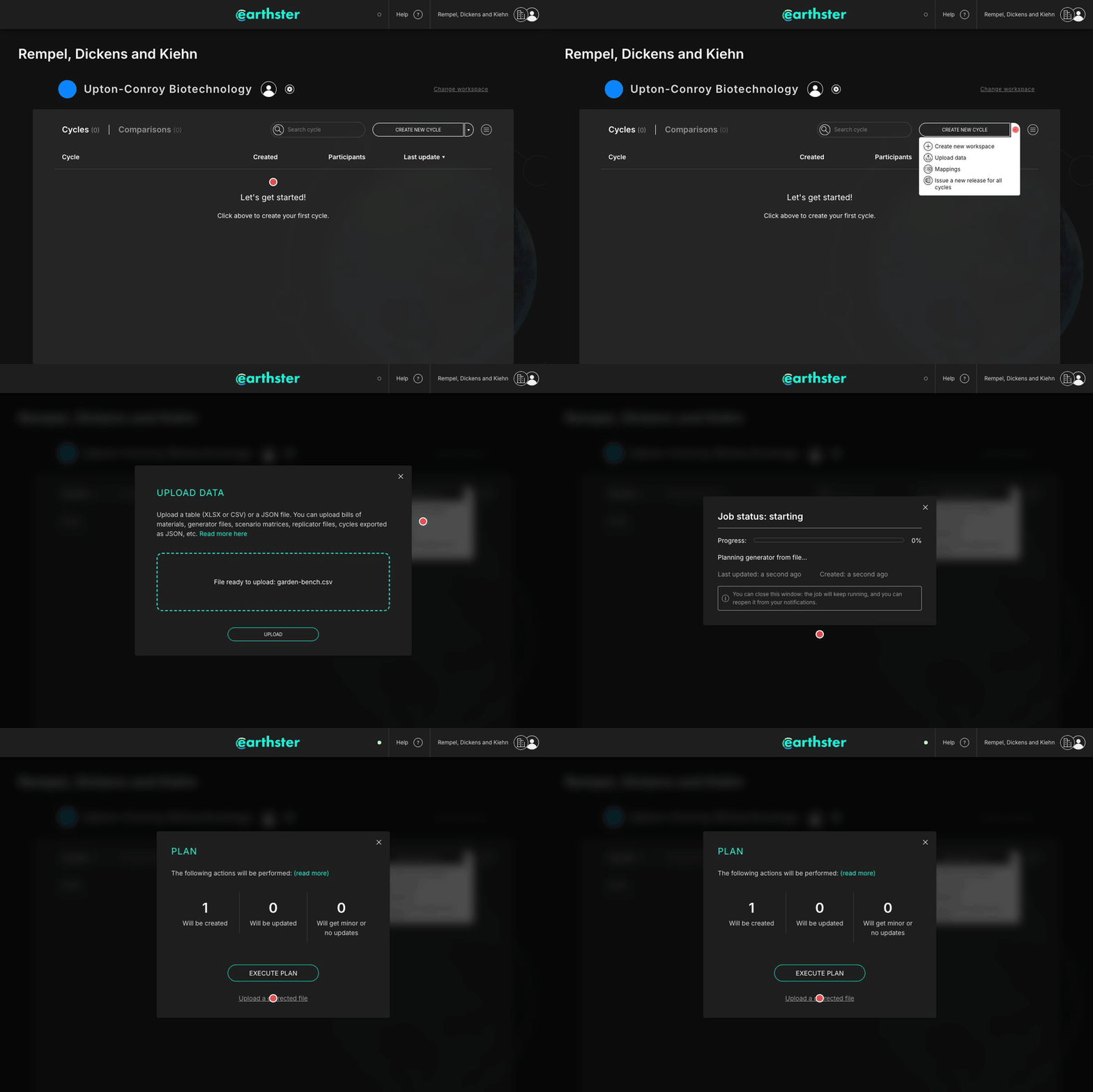
Create new cycle now has a single Upload data option. Generator CSV/XLSX, Update-in-batch files, even a cycle exported as JSON — drop any of them in and Earthster reads the file, works out what kind of upload it is, and takes you into the right workflow. One option instead of three, so you don't have to remember which workflow a file belongs to.
You can also drag and drop a file onto the cycles list and it opens Upload data with the file already in hand.
2. Your run, always at hand
Once you start an upload, you never lose it again. Open the run from the notifications bell to see the plan, follow its progress live, or grab the result — and pick up right where you left off. No re-uploading, no starting over.
3. Missing mappings? Fix them, then Continue
If your file references processes that still need mapping, the run now lists exactly which ones are missing and takes you there. Make the mappings, hit Continue, and you land back on your workspace cycles with the run open and the plan ready to execute — the round-trip is one continuous flow instead of a dead end.
4. Got the file wrong? Correct it in place
If a run fails or you spot a mistake in your file, you can now upload a corrected file to the same run. No starting over from scratch — fix the spreadsheet and re-run from where you are.
5. Lighter on big files
We made the parsing leaner: each cell is read once, repeated values are shared, and mappings are looked up once per run instead of per row. Larger generator files upload faster and use less memory, so big batch operations put noticeably less strain on the server.
6. Robust and transparent, all the way
The things that could quietly go wrong in a big upload now surface up front, ready to fix: duplicate mappings are rejected before they touch your data, re-runs automatically pick up the mappings you've added since, and units that don't match are resolved through their conversion factors — and anything that still doesn't fit is shown to you, never swallowed.
What this means for you
Taken together, these changes make batch uploading in Earthster feel like one tool instead of several steps. Any file goes through the same door. Every run stays in reach. Missing mappings and corrections become part of the flow, and large files move through quickly and cleanly. You spend less time managing the upload and more time on the work it supports. Drop in your next file and see how smoothly it goes.
If you're not yet an Earthster user... what are you waiting for? Book a meeting with us and let's get you started!